
For wholesale brands and the reps who sell for them
Win back the reorders waiting in your stores.
MaraMinder finds the stores due to reorder, most money first, and Mara writes each buyer's email from what she usually orders. You check it and press Send, from your own Gmail or Outlook.
Drop your orders file and see the reorder dollars waiting in your stores, in about a minute. No account, no card · nothing is sent until you press Send

 Today, your home page in MaraMinder (a sample brand). Mara has already written Bramble General Store's email: see it below.
This week on MaraMinder · updated last night
in reorders found waiting for the brands and reps on MaraMinder
See what's waiting in yoursAdded up every night from real users. Never a name.

Built by Nick Spooner, founder of Maramatch. 28 USA trade shows and more than 2,500 conversations with brands, reps, and buyers in Home Decor, Lifestyle, and Gifts since January 2023.
Works with any order file: Shopify, QuickBooks, NetSuite, Faire, MarketTime, or any CSV or Excel sheet.
Reorders
Reorders rarely stop with a no. They stop with silence.
These stores are due back this week, most money first. I've written each one's email from what they usually order. Check it, then press Send.
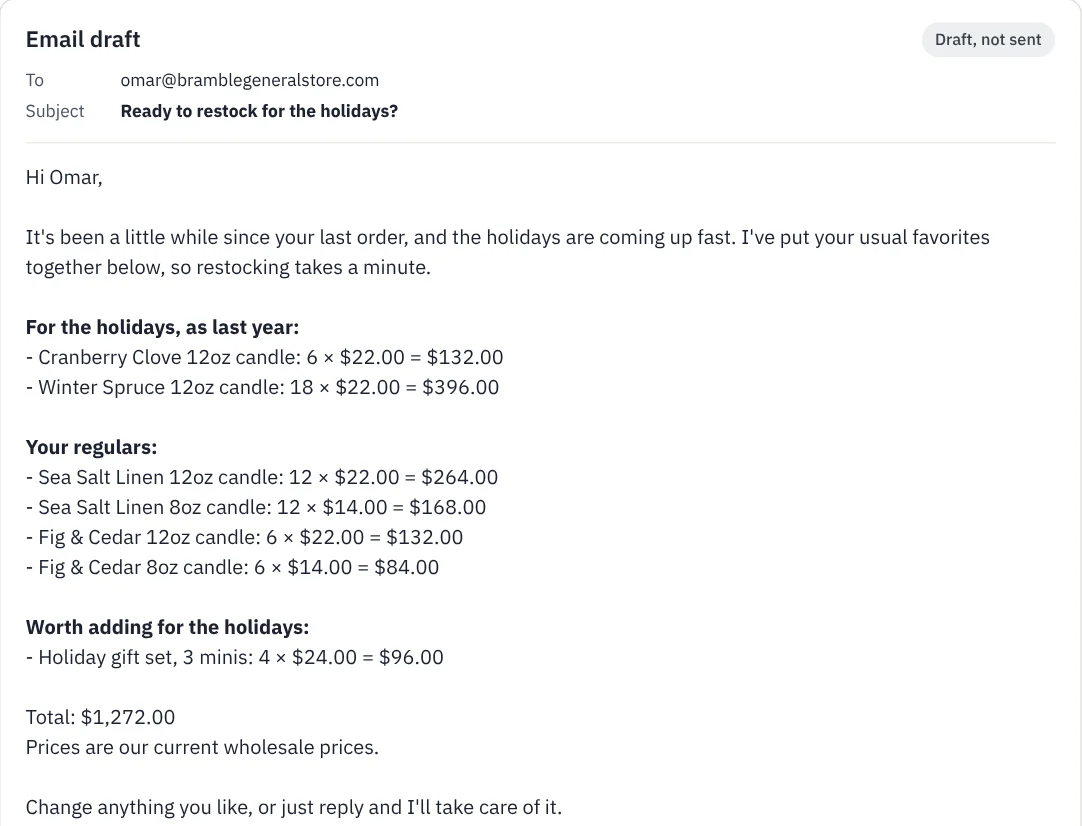
The top store on Today, and the email Mara wrote for it.
Where you start: Today. Today is your home page in MaraMinder. Each morning it lists the 10 stores most worth contacting this week, most money first, from your own order files, with why each one is due. Print it as a call sheet if you'd rather pick up the phone.
Tear sheets
New products, in front of the stores most likely to buy them.
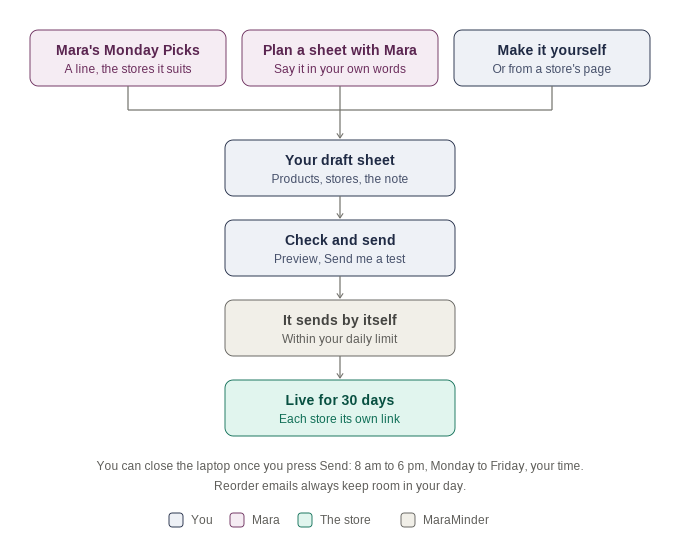
Every Monday I pick products and the stores that shop like your best buyers of them. Tell me what you want to show, and I'll plan the sheet with you.
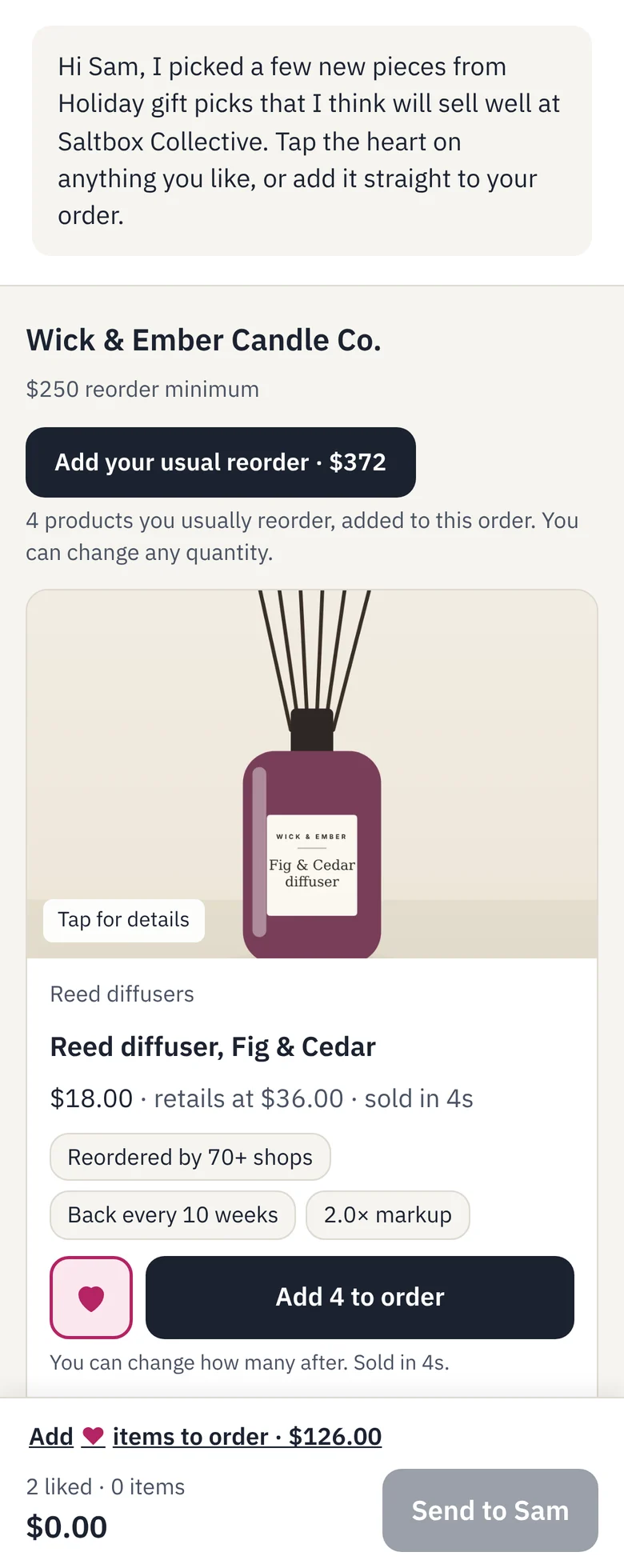
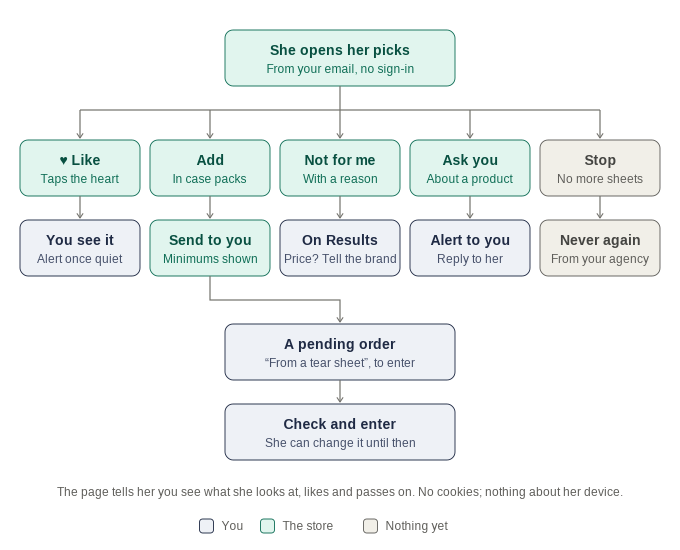
Each store gets its own page.
- Your note, her usual reorder in one tap, and the new products with photos and prices.
- She hearts what she likes, adds to her order, passes or asks, on her phone, with no sign-in.
- Your products, photos and prices are already in: pick a few, or let Mara.
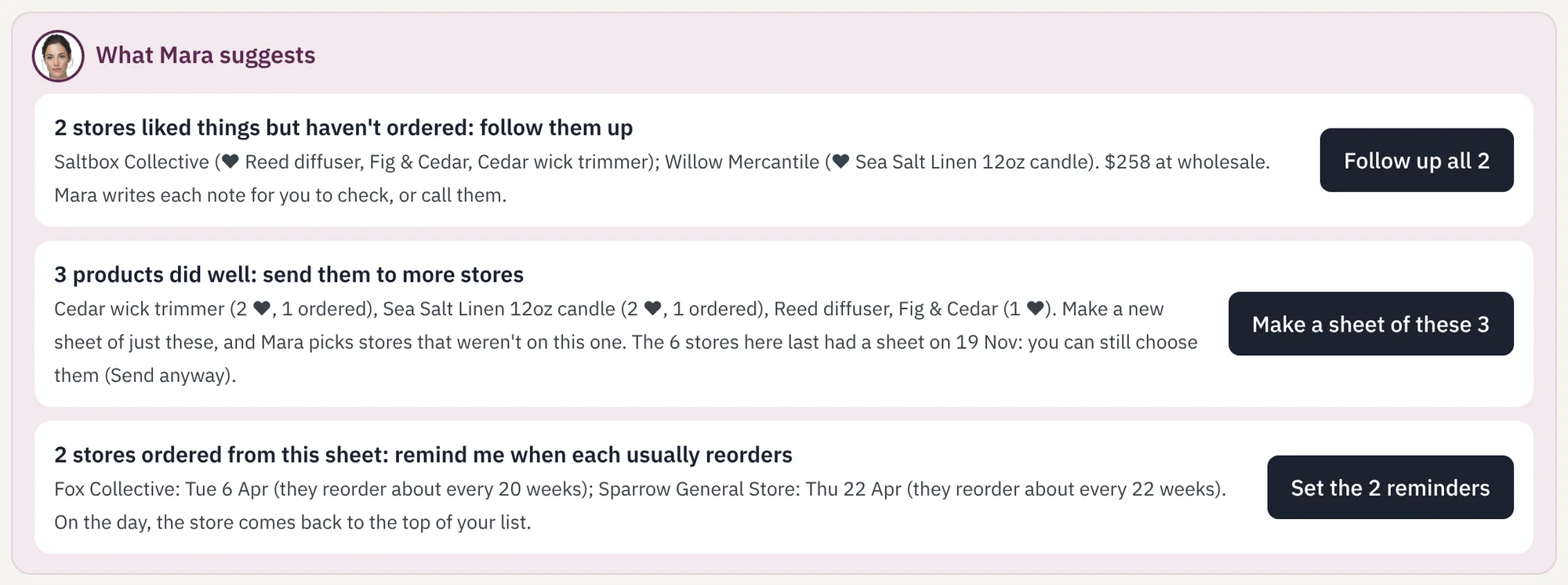
Then Mara tells you what to do next.
Buyer order page
Ordering from you becomes the easy part of her day.
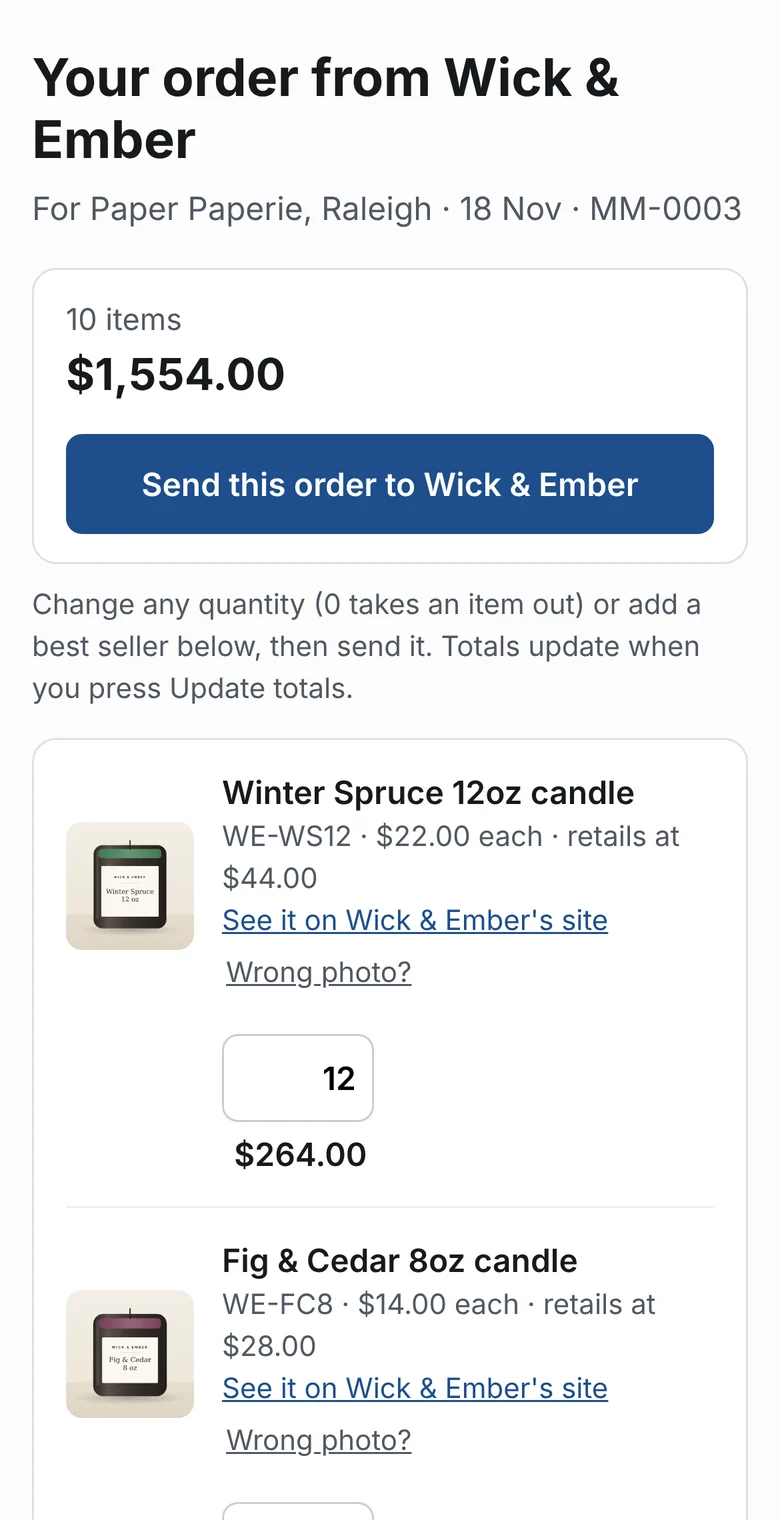
Every email carries a link to her own order page: her usual items with your photos and today's prices.
What she gets
- Her usual order, with your photos and today's prices.
- She changes quantities on her phone and sends it back.
- She downloads it as a PDF for her files, a spreadsheet, or a file ready to import into her Shopify store, with your product names, photos and prices, so she never retypes your products.
What you get

Never her email or phone on the page, and no tracking scripts.
How your week works
Your own stores from the first day. Then a few minutes each morning.
- 1
Add your order files
Any export from any system. Reps add MarketTime's Sales Analysis and the Order Code report. You check the columns before anything is used.
- 2
Open Today
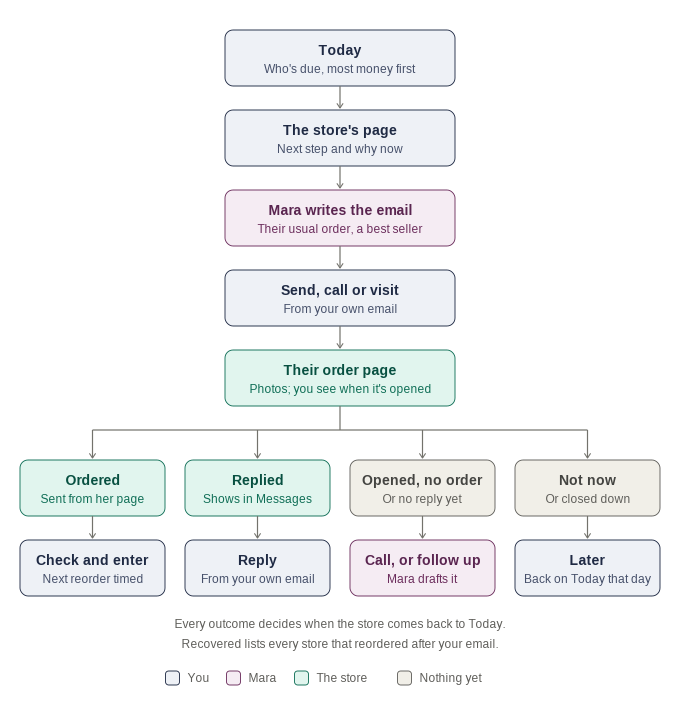
The ten accounts most worth it this week, most money first, weighted by how late they are, and why each one is there.
- 3
Mara writes, you send
A personal email with the store's usual order and a best seller they haven't tried. Change anything. Nothing goes out until you press Send.
- 4
Call, visit or Later
Log how a call or visit went, or put an account off to a day you pick. Done this week keeps score; a printable call sheet goes with you.
See every step on real screens, in about two minutes.
Every workflow, drawn out step by step including tear sheets with Mara

Meet Mara. Ask her anything about your week.
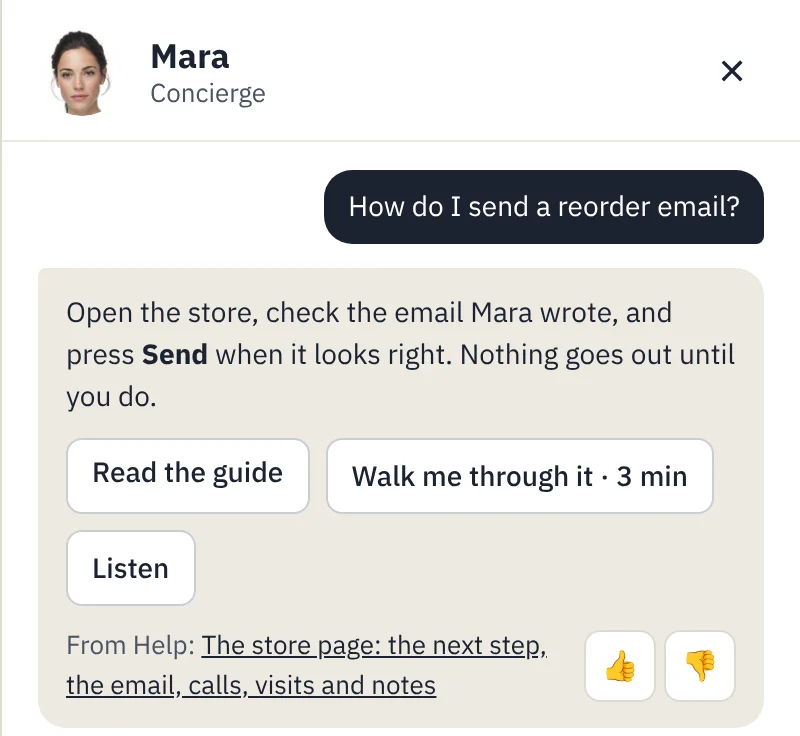
Mara is the AI assistant inside MaraMinder. Tap her face on any page: how to send, who to call, what a tear sheet did. She answers from MaraMinder's own help, reads it aloud if you like, and passes anything else to Nick.
Also included
From our early-access brands and reps
In their words
Coming next
On the roadmap now. You'll be informed when it's live.
Manage your leads here, instead of HubSpot
Upload your leads as they come. Mara fills in the emails you already have and writes each lead the right first email. Each lead moves along by itself as they open, reply and order, with notes and reminders, beside your customers in one place.
Her order, straight into her Shopify
With the MaraMinder app for Shopify, products she already sells are linked and new ones are added as drafts with your photos. Until then, Download for Shopify does it by file.
Connected straight to MarketTime
Orders and brands' items come in by themselves, so there are no reports to export and catalogues stay up to date.
Free shows you what's waiting. Paid brings it in.
Two plans, one price for brands and reps, per person. No card until you choose to pay.
Free
$0, no card
- Your opportunities: what's waiting in reorders, and how many stores
- The 10 stores most at stake, named
- 10 emails, each written by Mara, sent from your own Gmail or Outlook
- See who opened and replied
- No clock: your 10 emails never expire
Paid
$79 a month
Or $790 a year (two months free). Never goes up while you stay subscribed.
- Every store named, kept up to date every Monday
- Unlimited emails, with follow-ups
- Any number of uploads, every file type
- Tear sheets and brands' catalogues
- Download, print and the call sheet
Start free, no card. Upgrade inside MaraMinder when you're ready.
Money-back guarantee on paid plans: not happy in the first 30 days after your first payment? We refund everything you've paid. No questions asked.
Questions
Is it really free? What's the catch?
Free names the 10 stores most at stake and lets you send 10 emails from your own Gmail or Outlook, with no card and no clock. Paid names every store, keeps the list up to date and sends as many emails as you like: $79 a month or $790 a year, and your price never goes up while you stay subscribed. Nothing is charged unless you choose to pay.
Will it email my stores without me?
No. Every email waits for you to read it, change it if you like, and press Send. Safe test mode sends your first emails to you, not the store.
Which order systems does it work with?
Any. Shopify, QuickBooks, NetSuite, Faire, MarketTime, or any CSV or Excel sheet. MaraMinder matches the columns and you check them. Our export guides show the clicks for each system.
Does connecting my email let MaraMinder read it?
No. With Gmail and with company Outlook (Microsoft 365), MaraMinder asks only for permission to send, never to read. Disconnect any time. Details below and in our privacy policy.
What does the AI see of my customers?
Only what each email needs: when the store last ordered and what it usually orders. Store and buyer names go to the AI as placeholders and are put back on our own server. Your notes are never sent.
What about the stores Faire found for me?
Stores Faire found for you are never contacted. Your own customers, including those who order through your Faire Direct link, are yours to email.
We're an agency with several reps. How does that work?
Each rep gets their own MaraMinder, with their own lines and commission. For an agency set-up, book a call with Nick and tell him how many reps: he'll set you up together.
What is Today?
Today is your home page in MaraMinder, the first thing you see each morning. It lists the 10 stores most worth contacting this week, most money first, worked out from your own order files: who's due back, who has gone quiet, and who is waiting on you, such as a store that replied or sent an order. Each store has a reason and a next step, and the email Mara has written for it.
How often do I add my orders?
Whenever you like, and at least every 3 weeks, so Today and every email use your latest orders. It takes a minute: export the file and add it. Today shows how up to date your orders are, and turns amber when your newest file is more than 3 weeks old. On MarketTime, add the two reports (Sales Analysis and Order Code) again each time. Coming soon for reps and agencies: a direct MarketTime connection, so orders come in by themselves and there are no reports to export.
Talk to Nick
Book a call with Nick.
Thinking about MaraMinder? A free 20-minute call about your own stores and orders. No obligation. Pick a time in the calendar; Google sends the invitation.
- Ask anything: your order files, your email, how your week would look.
- Or skip the call and see what's waiting for you straight away.
Already using MaraMinder?
Stuck on a step, or want a hand with your files or email? Book 10 minutes with Nick, the same link as in the app.
What MaraMinder does, and doesn't do
How MaraMinder uses Gmail
MaraMinder only sends the emails you approve. It never reads your inbox.
When a brand connects Gmail, MaraMinder asks Google for permission to send email
(the gmail.send permission) and to see the address it's sending from. It can't read,
search, change or delete anything in the mailbox. Each email is sent only when the brand presses Send, and a
brand can disconnect Gmail at any time. Full details are in our privacy policy.
How MaraMinder uses Outlook
The same promise: MaraMinder only sends the emails you approve. It never reads your inbox.
MaraMinder sends from company Microsoft 365 accounts (personal
Outlook.com addresses can't connect). When you connect Outlook, MaraMinder asks Microsoft for permission to
send email as you (the Mail.Send permission) and to see the address it's sending from.
It can't read, search, change or delete anything in your mailbox. Your company's IT may need to approve
MaraMinder first, and you can disconnect at any time. Full details are in section 3a of our
privacy policy.
Your data stays yours
- Each brand's files and stores are kept separately, and only used to run MaraMinder for that brand.
- We don't sell data, and we don't use it for advertising.
- A brand can delete all of its data from MaraMinder at any time, with one button in its settings.
Who's behind it
Nick Spooner, founder of Maramatch · Atlanta, Georgia
Since January 2023 I've been to 28 USA trade shows and had more than 2,500 conversations with brands, reps, and buyers in Home Decor, Lifestyle, and Gifts.
nick@maramatch.com
Maramatch US headquarters: 1055 Brady Avenue NW, Atlanta, GA 30318
See which of your accounts have gone quiet
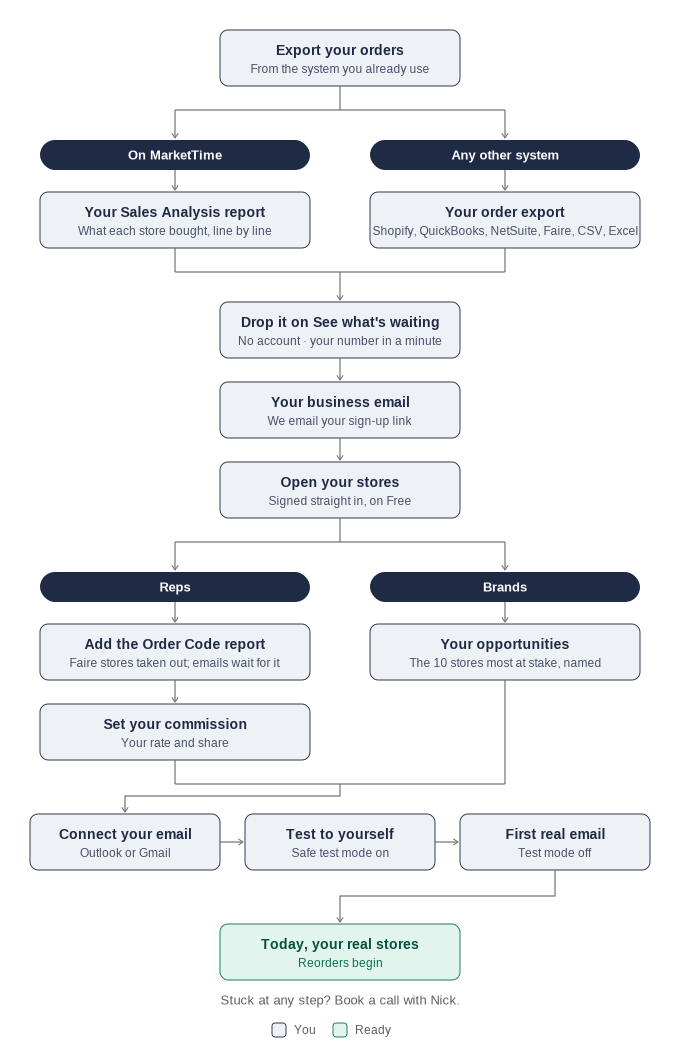
Drop your orders file and see the reorder dollars waiting in your stores, in about a minute. No account, no card.
- Drop your orders file: see the reorder dollars waiting, with no account.
- Open your stores, free: the 10 most at stake, named, with your business email.
- Send your first emails: Mara writes them; you check each one and press Send.
Free to start · no card