
How it works
Every workflow, step by step.
From your first sign-in to the store's order, drawn out and said in words. Mara's steps are in aubergine; you decide every one.
1 · Getting started
From your orders file to your real stores
Your number in about a minute, then your own stores, free.
On a phone, swipe the picture sideways. The steps are in words below.
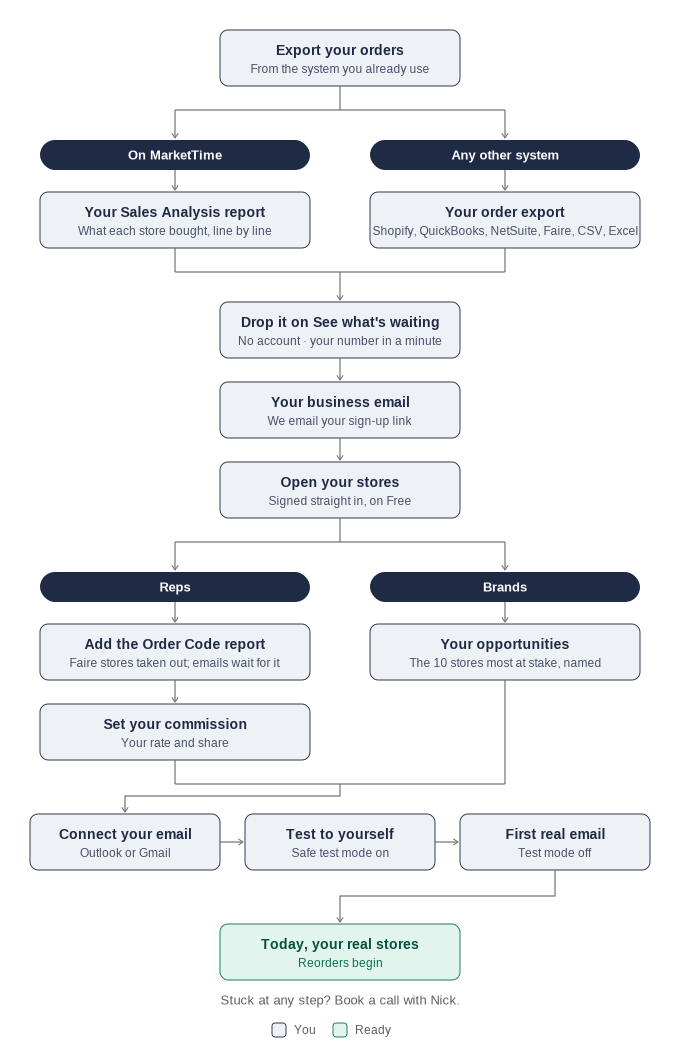
- Export your orders from the system you already use. On MarketTime: the Sales Analysis report. Any other system (Shopify, QuickBooks, NetSuite, Faire, CSV or Excel): one order export.
- Drop it on See what's waiting for you. With no account, you see the reorder dollars waiting in your stores, in about a minute.
- Give your business email and open the link we send: Open your stores signs you straight in, on Free, with the file already added.
- Brands land on Your opportunities: the 10 stores most at stake, named. Reps add the Order Code report (stores that came through Faire are taken out; emails wait for it), then set their commission (rate and share).
- Connect your Outlook or Gmail, send yourself a test with safe test mode on, then your first real email. Today, your home page in MaraMinder, then shows your real stores. Stuck at any step? Book a call with Nick.
2 · Reorders
Today, the email, and every way it can go
The heart of MaraMinder: the accounts most worth your time, and what to say to each.
On a phone, swipe the picture sideways. The steps are in words below.
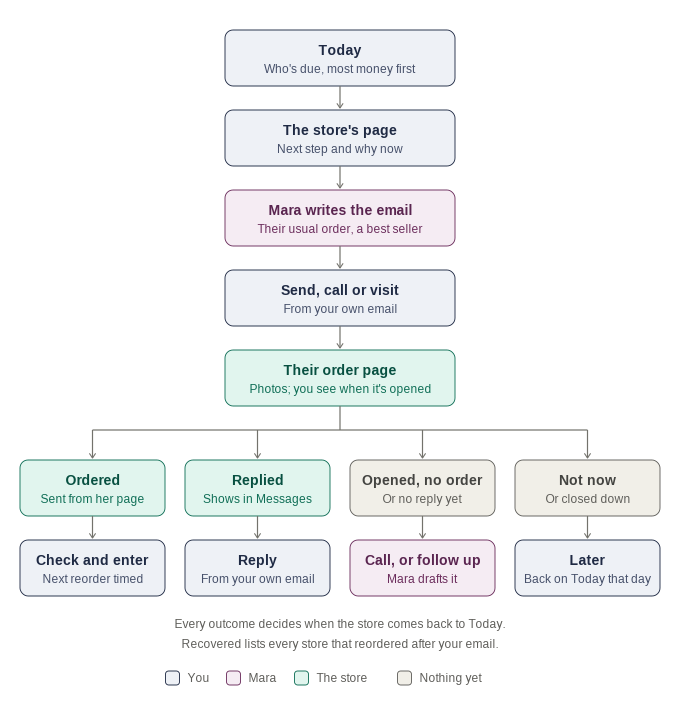
- Today, your home page in MaraMinder, shows who's due each morning, most money first. Each store's page says why now and the next step.
- Mara writes the email: the store's usual order at today's prices, and a best seller they haven't tried. Change anything; send it from your own email, or call or visit instead.
- The email links to her order page: every item with its photo. You see when it's opened, and how often.
- Ordered: check it and enter it; the next reorder is timed. Replied: it's in Messages; answer from your own email. Opened, no order: a good moment to call, or send the follow-up Mara drafts. Not now: Later, and it's back on Today that day; or Closed down.
- Recovered lists every store that reordered after your email.
Try it on your own accounts, free to start.
See what's waiting for you3 · Tear sheets
New products, in front of the right stores
A tear sheet is a page of products picked for one store, which she opens on her phone and orders from. Four pictures: how a sheet starts, planning one with Mara, what the store does, and what happens after.
Three ways to start a sheet
Mara can pick the line and the stores for you, plan it with you in a chat, or leave it to you.
On a phone, swipe the picture sideways. The steps are in words below.
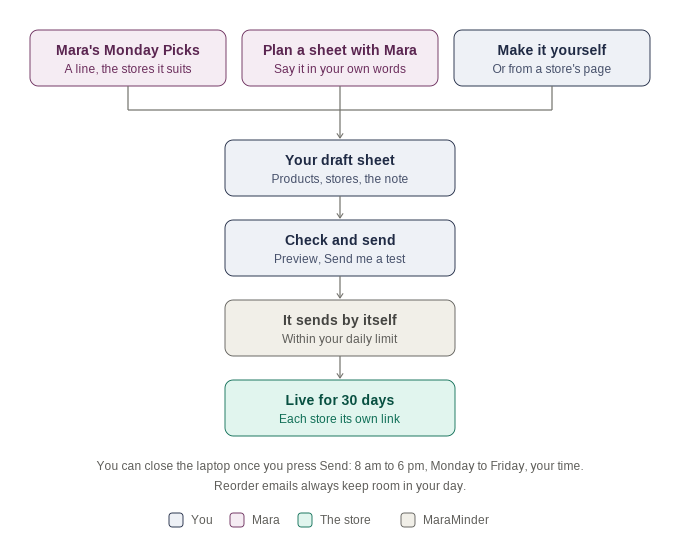
- Mara's Monday Picks, on Today and Tear sheets: a line, the stores it suits and why, and about what it's worth to you. Make this sheet starts the draft.
- Plan a sheet with Mara: say what you're planning in your own words (below).
- Make it yourself: products, stores (Mara suggests up to 25, or a saved list), and a note (Write it for me). Or start from a store's page.
- Check it with Preview and Send me a test, then Send. It goes by itself, one store every 20 to 40 seconds, within your daily limit, 8 am to 6 pm on weekdays. Reorder emails always keep room.
- Each store has its own link, live for 30 days.
Plan a sheet with Mara
Say it the way you'd say it to a colleague: “Valentine's for my gift shops, under $30 retail.”
On a phone, swipe the picture sideways. The steps are in words below.
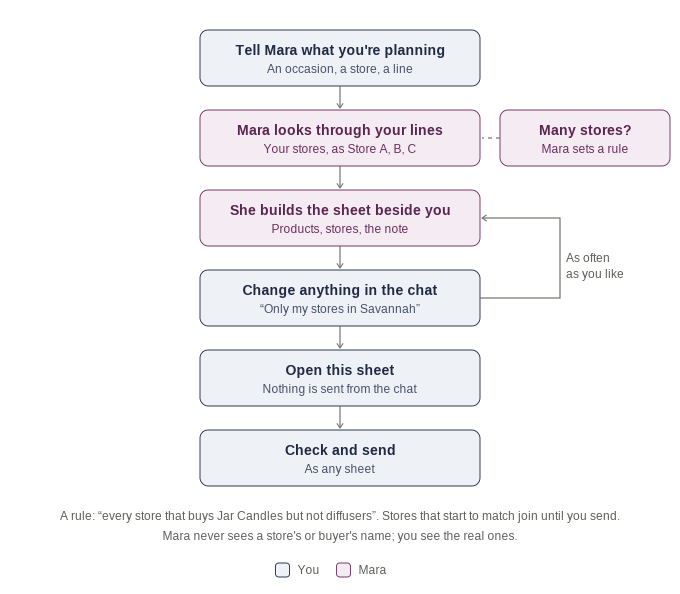
- Tell Mara what you're planning: an occasion, a vibe, a store, or who'd take a line. Choose how many products, or let her decide.
- She looks through your own lines and stores, and builds the sheet beside the chat: the products, the stores, and the note when you ask.
- For many stores she sets a rule, such as “every store that buys Jar Candles but not diffusers”. Stores that start to match join until you send.
- Change anything in the chat (“take off the vase”, “only my stores in Savannah”). Nothing is sent from the chat: Open this sheet to check and send it.
- Mara sees your stores as Store A, Store B; their names stay in MaraMinder.
What the store does with it
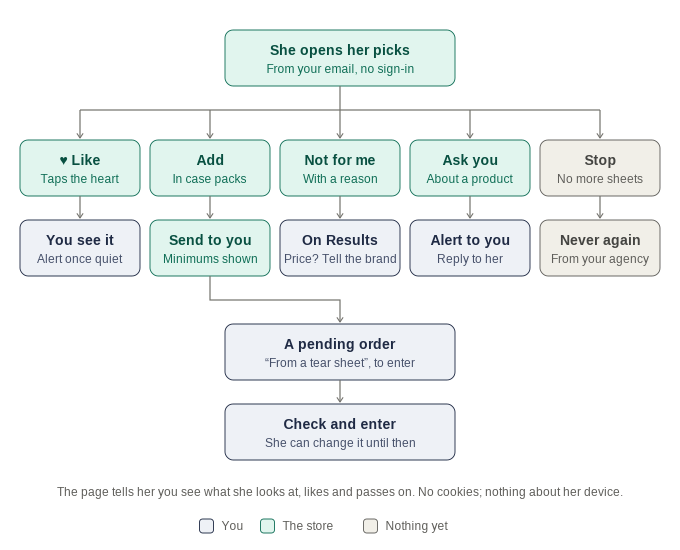
Her picks open on her phone from your email, with no sign-in.
On a phone, swipe the picture sideways. The steps are in words below.
- On each product she can tap the heart, Add it in the brand's case packs, say Not for me (and why), or Ask you about it.
- Each line shows its minimum as she adds; a store due a reorder can add its usual reorder in one tap.
- Send makes a pending order marked “From a tear sheet”. She can change it until you mark it entered.
- Keep a copy: print the sheet, or download it as a spreadsheet or a file for her Shopify.
- Stop these picks means no more tear sheets from your agency. Reorder emails aren't affected.
- The page tells her you see what she looks at, likes and passes on. No cookies, and nothing about her device or where she is.
After you send: results and follow-up
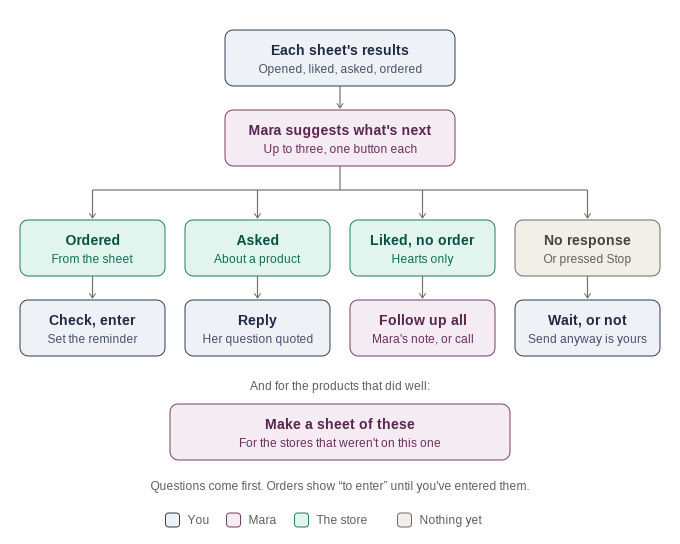
Every sheet has its own results, with Mara's suggestions for what to do next.
On a phone, swipe the picture sideways. The steps are in words below.
- Each sheet's results show, store by store, who opened it, liked, asked and ordered. Mara suggests up to three next steps, questions first.
- Ordered: check the order, enter it, and set the reminder for their next reorder.
- Asked: Reply opens your email with her question quoted.
- Liked, no order: Follow up all puts every such store on one page, each with Mara's note to change and send, or call instead.
- No response: MaraMinder suggests waiting 3 weeks before another sheet; Send anyway is always yours. A store that pressed Stop gets no more.
- For the products that did well, Make a sheet of these for the stores that weren't on it.
4 · Brands' catalogues
Set up each brand once, for every rep
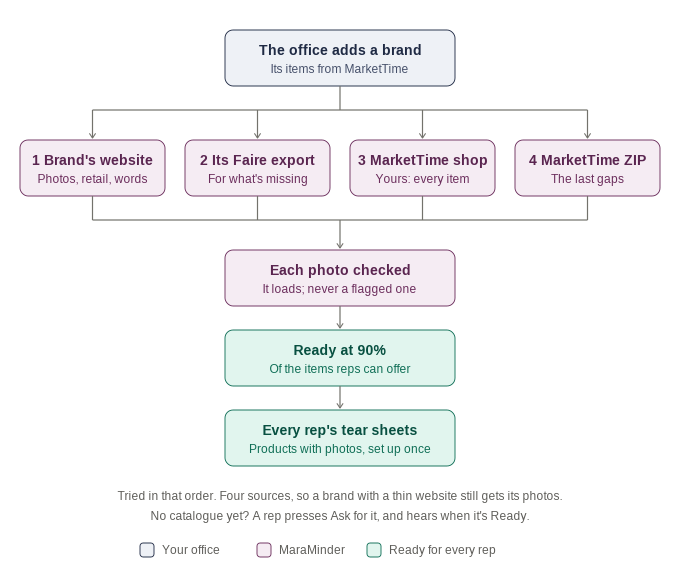
For agencies: the office adds a brand once, and every rep's tear sheets use it.
On a phone, swipe the picture sideways. The steps are in words below.
- The office adds a brand's items from MarketTime, on the brand's own page under Brands' catalogues.
- MaraMinder finds the photos itself, from four places in turn: the brand's website, its Faire export, your agency's MarketTime shop, then MarketTime's images ZIP. Each photo is checked to load, and one a buyer flags is never used.
- A brand is Ready once 90% of the items reps can offer have a photo. Every rep who carries it sees its products on their tear sheets.
- A rep whose line has no catalogue yet presses Ask for it: the office gets a ready email, and the rep hears when it's Ready.
5 · Into her Shopify
Your order, straight into the store's Shopify
Coming Q4 2026 With the MaraMinder app for Shopify, for reps' MarketTime orders. You'll be informed when it's live.
On a phone, swipe the picture sideways. The steps are in words below.
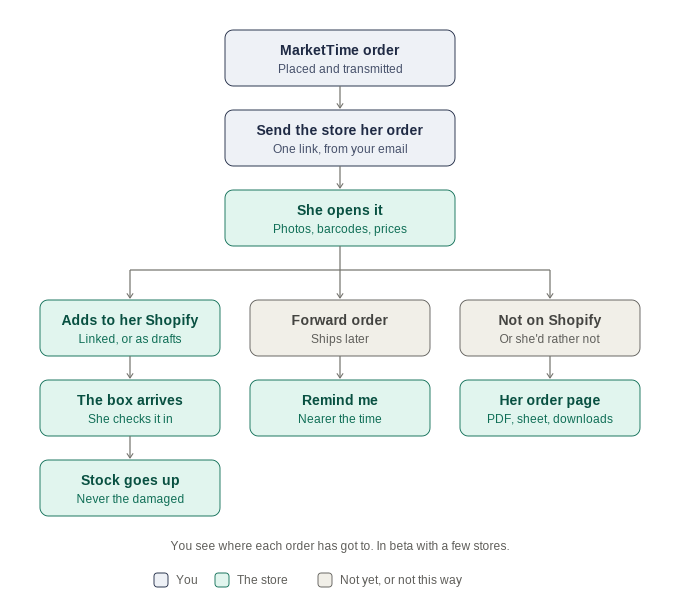
- A MarketTime order arrives in MaraMinder. You send the store its order: one link, from your own email.
- She opens it: photos, barcodes and prices. If she's on Shopify, she adds it: products she already sells are linked, new ones go in as drafts with the brand's photos, her prices and SKUs.
- When the box arrives she checks it in, and her stock goes up by what came, never the damaged.
- A forward order: Remind me nearer the time. Not on Shopify, or she'd rather not: her order page with the PDF, the spreadsheet and the downloads.
- You see where each order has got to.
Now run it on your own accounts.
Free to start. No card. Your number in about a minute, before you sign up.
Prefer to talk first? Book a call with Nick